> ## Documentation Index
> Fetch the complete documentation index at: https://vibewax.be/docs/llms.txt
> Use this file to discover all available pages before exploring further.
# GitHub
> Back up and sync your Vibewax project with GitHub
Vibewax's GitHub integration connects your project to a private GitHub repository. Back up your code, sync changes both ways, and pick your project back up in a new chat whenever you need to.
## Why connect GitHub
- **Back up your project to a private repo.** Your code lives in a GitHub repository you own.
- **Push updates to GitHub.** Send your latest Vibewax version to the repo as a pull request you merge.
- **Pull changes back into your project.** Restore your project from the version stored on GitHub.
- **Import a project from GitHub.** Start a new Vibewax project from a repository you pushed earlier.
## Connect GitHub to your project
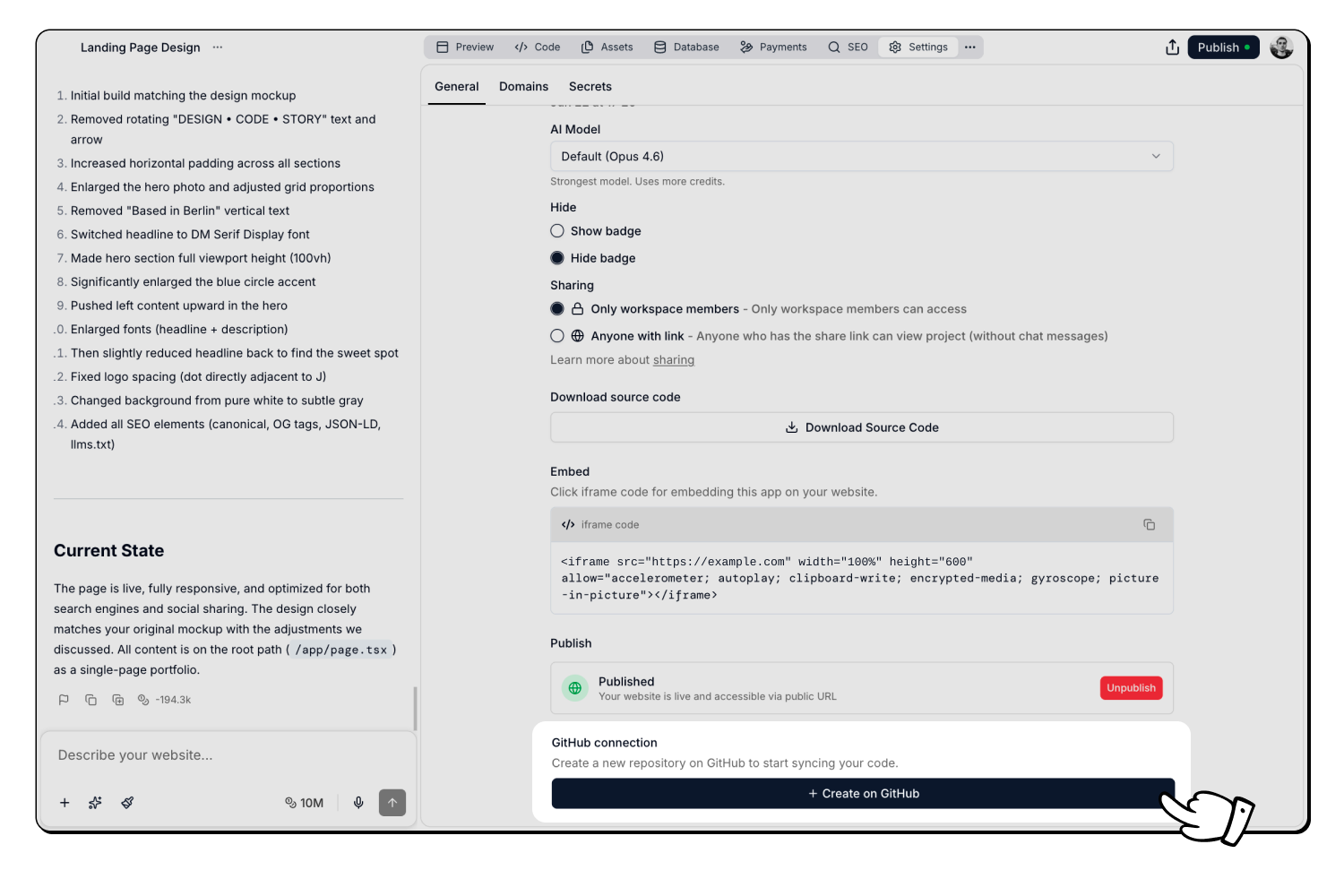
In your project, click **Settings** in the top bar, then open the **General** tab.
Scroll to **GitHub connection** and click **Create on GitHub**. The first time, you'll authorize Vibewax on GitHub and choose which GitHub account or organization to connect. Pick one that already has the app, or choose **Install on another GitHub account**. Vibewax then creates a private repository and syncs your project into it.
 The section now shows your repository name with a link to open it on GitHub. From here you can push and pull changes.
## Push and pull changes
Once your repository is linked, the **GitHub connection** section shows two buttons:
- **Push changes** sends your latest Vibewax version to GitHub. Vibewax opens a pull request titled "Updates from Vibewax" that you review and merge on GitHub.
- **Pull changes** replaces your project's files with the version from GitHub. Vibewax asks you to confirm first. Your `.env` and `.env.local` files are always kept.
To unlink the repository, click the `X` button next to its name.
## Import a project from GitHub
You can start a new Vibewax project from a repository you previously pushed from Vibewax.
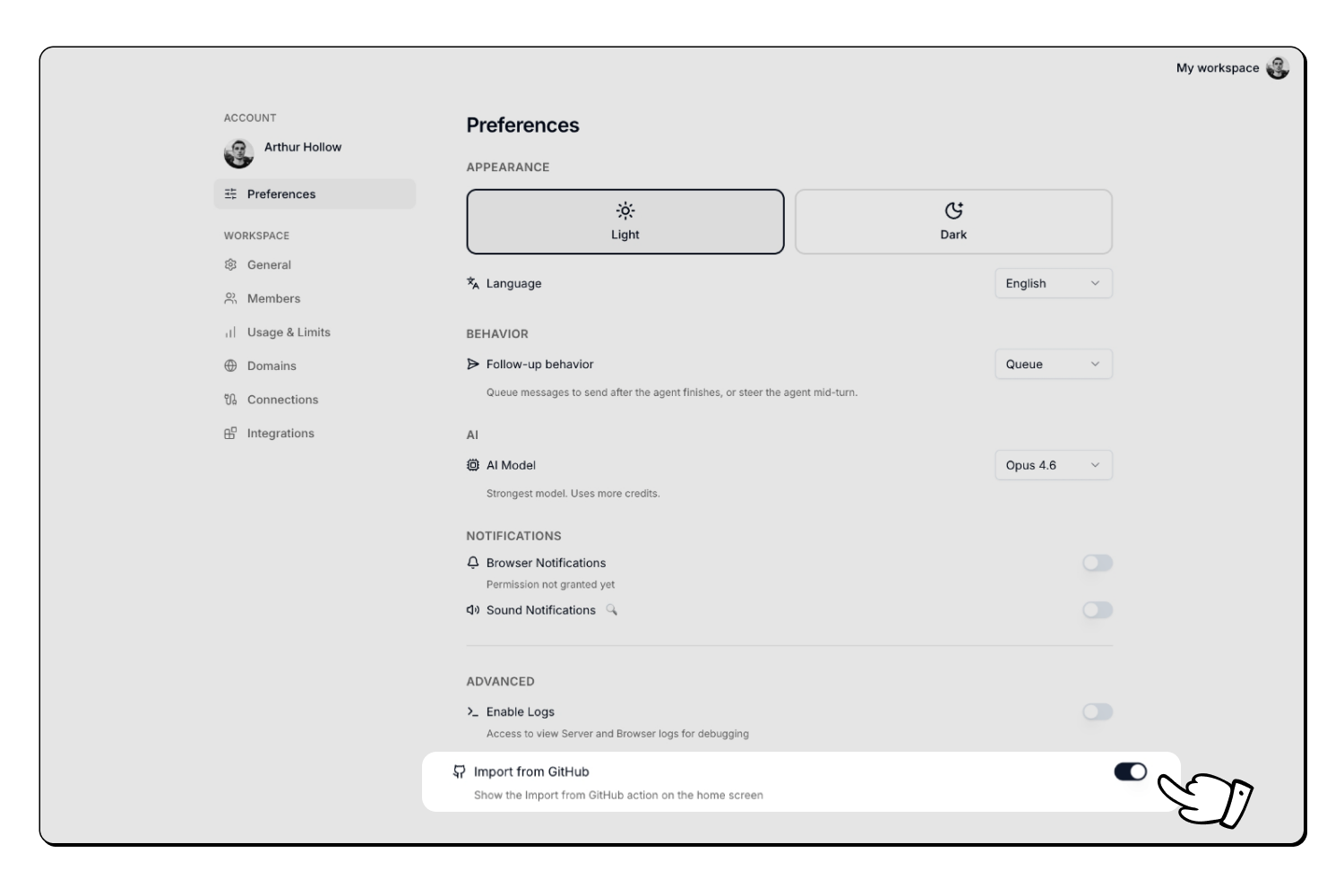
Open **Preferences** in your account settings, scroll to **Advanced**, and enable **Import from GitHub**. This shows the action on the home screen.
The section now shows your repository name with a link to open it on GitHub. From here you can push and pull changes.
## Push and pull changes
Once your repository is linked, the **GitHub connection** section shows two buttons:
- **Push changes** sends your latest Vibewax version to GitHub. Vibewax opens a pull request titled "Updates from Vibewax" that you review and merge on GitHub.
- **Pull changes** replaces your project's files with the version from GitHub. Vibewax asks you to confirm first. Your `.env` and `.env.local` files are always kept.
To unlink the repository, click the `X` button next to its name.
## Import a project from GitHub
You can start a new Vibewax project from a repository you previously pushed from Vibewax.
Open **Preferences** in your account settings, scroll to **Advanced**, and enable **Import from GitHub**. This shows the action on the home screen.
 On the home screen, open the **+** menu in the prompt bar and choose **Import from GitHub**.
Search for the repository and select it. Vibewax creates a new project from it. Use **Configure** to reconnect GitHub or switch accounts, and **Refresh** to reload the list. You only see repositories your GitHub account can access.
Import works with repositories that Vibewax created. Importing an external, non-Vibewax repository isn't supported.
## What gets synced
Your project files, components, pages, styles, assets, and Vibewax configuration are included. Environment variables (`.env` files) and cache files are never pushed, and pulling never overwrites your `.env` and `.env.local`.
## Good to know
- **Repositories are always private.** Your code is never made public by Vibewax.
- **A free GitHub account works.** You don't need a paid GitHub plan.
- **Pushing opens a pull request** you merge on GitHub. It doesn't change your live site.
- **Pulling replaces your project files** but keeps your `.env` and `.env.local`.
This page is part of the [Vibewax documentation](https://vibewax.be/docs/en/welcome/overview).
On the home screen, open the **+** menu in the prompt bar and choose **Import from GitHub**.
Search for the repository and select it. Vibewax creates a new project from it. Use **Configure** to reconnect GitHub or switch accounts, and **Refresh** to reload the list. You only see repositories your GitHub account can access.
Import works with repositories that Vibewax created. Importing an external, non-Vibewax repository isn't supported.
## What gets synced
Your project files, components, pages, styles, assets, and Vibewax configuration are included. Environment variables (`.env` files) and cache files are never pushed, and pulling never overwrites your `.env` and `.env.local`.
## Good to know
- **Repositories are always private.** Your code is never made public by Vibewax.
- **A free GitHub account works.** You don't need a paid GitHub plan.
- **Pushing opens a pull request** you merge on GitHub. It doesn't change your live site.
- **Pulling replaces your project files** but keeps your `.env` and `.env.local`.
This page is part of the [Vibewax documentation](https://vibewax.be/docs/en/welcome/overview).